Inside a monthly website maintenance routine: What should really happen every four weeks
By Michael Bridges · Published July 19, 2026
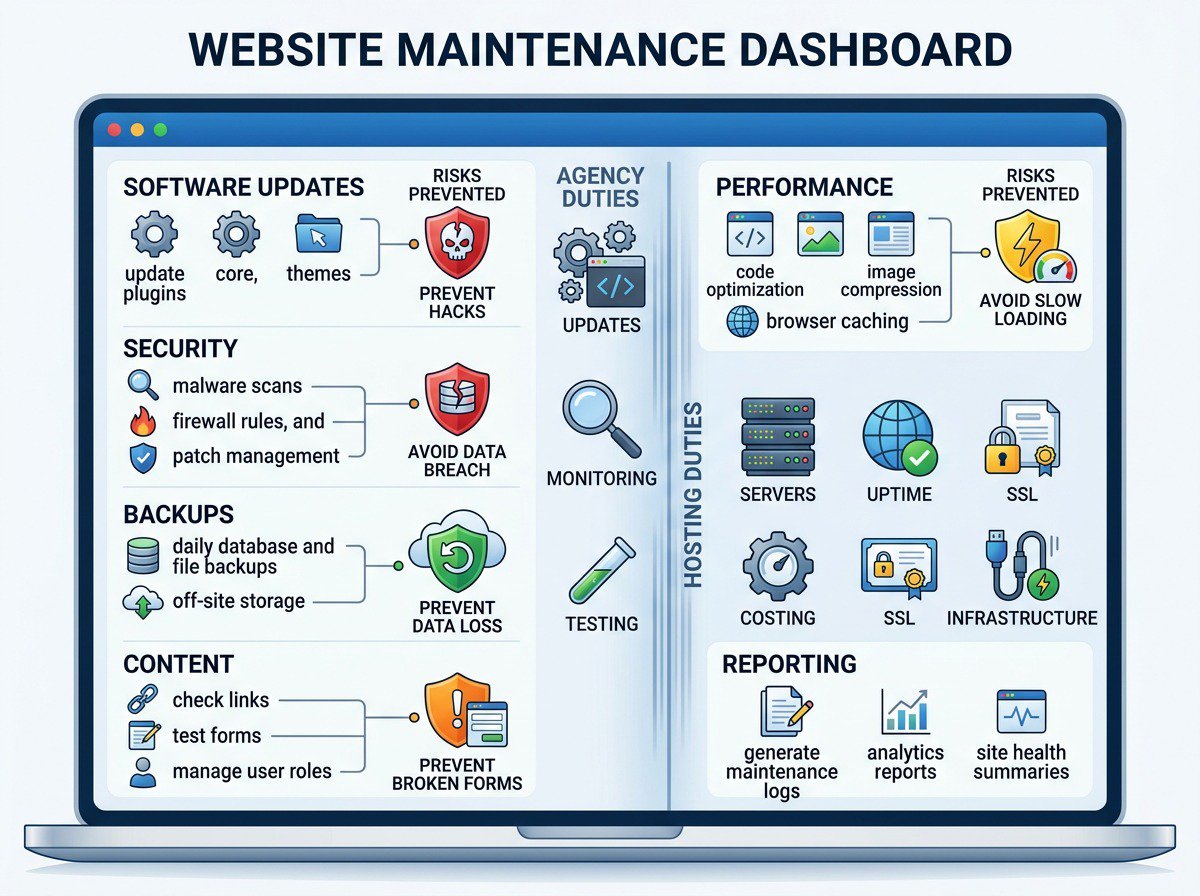
A business website needs more than occasional updates when something stops working. Every four weeks, it should go through a structured maintenance routine that checks its software, security, backups, speed, content, forms, reporting, and other web maintenance needs.
For small and mid-sized businesses, this routine reduces preventable problems. It helps protect against hacks and security breaches, limits the impact of data loss, catches broken forms, and keeps the website useful for customers and search engines.
Monthly maintenance does not mean every task takes an entire month. Some checks may take minutes, while others require technical review and testing. The important part is consistency, documentation, and clear ownership.
A practical maintenance routine should be based on the website’s risk profile, not only on a calendar. The Cybersecurity and Infrastructure Security Agency’s small-business resources emphasize software updates, strong authentication, logging, backups, encryption, and data protection as foundational cybersecurity practices.Why monthly website maintenance matters
A website can appear normal while problems develop behind the scenes. A plugin may become outdated, a software update may create a conflict, a backup may fail, or a contact form may stop sending messages without anyone noticing.
These issues can affect revenue and reputation:
- A hacked website can expose business or customer data.
- A failed backup can make recovery difficult after an attack or server problem.
- Slow pages can cause visitors to leave before they contact the business.
- Broken forms can prevent qualified leads from reaching the sales team.
- Outdated content can make the business appear inactive or unreliable.
- Unresolved technical errors can reduce visibility in search results.
A monthly routine creates a repeatable process for finding and fixing these problems before they become larger business disruptions. It also gives businesses a defined set of tasks to review consistently.
Why monthly website maintenance matters
A website can appear normal while problems develop behind the scenes. A plugin may become outdated, a software update may create a conflict, a backup may fail, or a contact form may stop sending messages without anyone noticing.
These issues can affect revenue and reputation:
- A hacked website can expose business or customer data.
- A failed backup can make recovery difficult after an attack or server problem.
- Slow pages can cause visitors to leave before they contact the business.
- Broken forms can prevent qualified leads from reaching the sales team.
- Outdated content can make the business appear inactive or unreliable.
- Unresolved technical errors can reduce visibility in search results.
The risk is not limited to large organizations. CISA notes that small businesses are also targeted by cybercriminals and recommends measures such as software updates and multifactor authentication to reduce common attack paths. Its guidance for small businesses offers useful context for business owners evaluating their website and broader digital security responsibilities.
A monthly routine creates a repeatable process for finding and fixing these problems before they become larger business disruptions. It also gives businesses a defined set of tasks to review consistently.
What should happen during a monthly maintenance cycle?
A thorough routine usually covers six areas:
- Software updates
- Security checks
- Backup verification
- Performance monitoring
- Content and conversion reviews
- Reporting and recommendations
The exact work depends on the website platform, hosting environment, integrations, and business goals. A simple brochure website may need less hands-on work than an e-commerce store, membership site, or website connected to several third-party systems.
The right website maintenance plan should match the website’s needs, risk level, and monthly budget.
1. Review and apply software updates
Most websites rely on several layers of software. These may include the content management system, plugins, themes, frameworks, server components, and third-party integrations.
A monthly maintenance routine should review available updates and determine which ones are safe to apply.
Typical software updates include
- Content management system updates
- Plugin or extension updates
- Theme updates
- Security patches
- Form and email delivery tools
- Analytics and tracking integrations
- E-commerce components
- Caching and optimization tools
- Server software, when managed by the website team or hosting provider
Updates are not simply a matter of clicking an update button. A responsible process includes checking compatibility, creating a current backup, applying changes, and testing the website afterward.
Official WordPress guidance follows the same principle. Website owners should back up the site before updating, apply changes carefully, clear caches when necessary, and restore the backup if an update causes a problem. The exact process varies by platform, but the underlying rule is consistent: updates should be controlled and followed by testing. See the WordPress update guidance for a platform-specific example.Why software updates prevent risk
Why software updates prevent risk
Outdated software can contain known security weaknesses. Attackers often target common platforms and plugins because vulnerabilities may be publicly documented and easy to exploit.
Updates can also resolve bugs and improve compatibility. However, an update can sometimes create a conflict with another component. Testing helps identify problems such as:
- A page layout changing unexpectedly
- A form no longer submitting
- A payment feature failing
- A menu not opening on mobile devices
- An analytics tag disappearing
- A website showing an error message
A safer update process
A sound monthly process should follow these steps:
- Review available updates and release notes.
- Identify updates that affect security, compatibility, or functionality.
- Confirm that a recent backup exists.
- Apply updates in a controlled order.
- Check the website on desktop and mobile devices.
- Test important forms, buttons, menus, and integrations.
- Record what changed and whether any follow-up work is needed.
For higher-risk websites, updates may first be tested in a staging environment. This is a separate copy of the website where changes can be reviewed before they reach the live site.
2. Complete security checks
Security monitoring should be part of every monthly maintenance routine. A website does not need to be large to become a target. Automated attacks often search the internet for vulnerable software, weak passwords, exposed files, and poorly configured systems.
Monthly security work should look for signs of compromise and reduce opportunities for unauthorized access.

Common monthly security checks
- Review security scan results
- Check administrator accounts and user permissions
- Remove unused user accounts
- Confirm strong passwords and multi-factor authentication where available
- Review failed login activity
- Check for unauthorized file changes
- Confirm that security tools are active
- Review malware or blacklist alerts
- Inspect suspicious redirects, pop-ups, or new pages
- Confirm that the website uses HTTPS
- Review domain and SSL certificate status
- Check for outdated or abandoned plugins
CISA recommends that small and mid-sized businesses combine software updates with strong passwords, multifactor authentication, logging, backups, and encryption. These controls extend beyond the website itself, but they can directly affect website administration because compromised email, hosting, or administrator accounts may provide access to the site. Itssmall-business resource centerincludes practical guidance for these areas.
Why these checks prevent specific risks
A compromised administrator account can allow an attacker to change content, add malicious code, or create new accounts. Removing unused accounts reduces the number of possible entry points.
Access should also follow the principle of least privilege. CISA’s hardening guidance for managed service providers and small businesses recommends limiting administrative access, reviewing permissions, and using multifactor authentication wherever possible.
A malware scan can identify suspicious files or scripts. Monitoring can also reveal changes that are not visible to ordinary visitors, such as hidden links or code that redirects search engine users to another site.
An expired SSL certificate can trigger browser warnings and reduce visitor trust. It may also prevent secure forms or payment functions from working properly.
Services such as Instatus website monitoring can support availability monitoring by checking response codes, response times, page content, headers, and SSL certificate validity. These tools complement, but do not replace, website security reviews.
Security is an ongoing responsibility
A monthly review is important, but it is not a replacement for daily monitoring where the website requires it. Websites that process payments, store customer information, or support important business operations may need more frequent alerts and response procedures.
The maintenance team should also know what to do if a security issue is detected. A basic response plan may include:
- Confirming the issue.
- Restricting access if necessary.
- Preserving logs and evidence.
- Restoring a clean version of the website.
- Changing affected credentials.
- Scanning all connected systems.
- Documenting the incident and corrective actions.
3. Verify backups instead of assuming they work
A backup is useful only if it can be restored. Many websites have automated backups configured, but no one checks whether the files are complete, recent, or usable.
Monthly maintenance should include a review of the backup system and, when appropriate, a test restoration.
NIST makes the same distinction in its guidance on ransomware and data loss. Backup files should be created, maintained, and tested so they remain available and usable during recovery. A successful backup job is not enough if the files are incomplete, inaccessible, corrupted, or missing the database. The NIST backup and recovery guide provides a useful framework for evaluating a backup process.
A complete backup strategy should consider
- Website files
- Databases
- Uploaded images and documents
- Configuration files
- Form entries, where stored
- E-commerce orders, where applicable
- Email or marketing integration settings
- Backup frequency
- Backup retention
- Backup storage location
- Restore procedures
The backup should not exist only on the same server as the live website. If the server fails or an attacker gains access to the hosting account, both the website and its backup could be affected.
Why backup verification prevents data loss
A current, separate backup provides a recovery option after events such as:
- Malware infection
- Accidental deletion
- Failed software updates
- Hosting problems
- Database corruption
- Human error
- A damaged website migration
The monthly review should confirm when the last successful backup ran and whether the expected files and database were included. For important websites, the agency should periodically restore a backup in a safe environment to confirm that recovery is practical.
Current NIST guidance also emphasizes integrating backups into change management, testing them regularly, and reviewing them during recovery exercises. The NIST backup quick-start guide is written for operational technology environments, but its principles are relevant to any website where recovery speed and data integrity matter.
What business owners should ask
Business owners should know:
- How often backups run
- Where backups are stored
- How long backups are retained
- Who can restore the website
- How quickly restoration can begin
- Whether the backup includes the database
- Whether the backup process has been tested
A hosting provider may offer automatic backups, but the agency should confirm that those backups meet the website’s business needs. The two responsibilities are related but not always the same.
4. Monitor website performance
Website performance affects user experience, accessibility, conversions, and search visibility. A site that loads slowly may lose visitors before they see the company’s services or submit a form.
Google describes page experience as broader than a single speed score. Its current guidance includes Core Web Vitals, secure HTTPS delivery, mobile usability, intrusive interstitials, and the overall ease of using the page. The Google page experience documentation can help teams evaluate performance without treating SEO as the only reason to improve the user experience.

Performance checks may include
- Page load speed
- Mobile performance
- Desktop performance
- Server response time
- Image file sizes
- Caching status
- Broken links
- JavaScript or CSS errors
- Database performance
- Core Web Vitals
- Traffic changes
- High-exit pages
- Availability and downtime
Core Web Vitals provide a useful set of measurements for loading performance, interactivity, and visual stability. The current metrics are Largest Contentful Paint, Interaction to Next Paint, and Cumulative Layout Shift. TheWeb Vitals documentation explains how these measurements work and how they can be evaluated across real users and devices.
Why performance monitoring prevents slow load times
Slow performance can result from large images, excessive plugins, inefficient code, poor hosting resources, database problems, or third-party scripts.
A monthly review helps identify trends. For example, a website may have gradually become slower after several new tracking tools, videos, or plugins were added. The problem may not be obvious from a single page visit, but performance reports can show the change over time.
Practical performance improvements
Depending on the findings, the maintenance team may:
- Compress or resize images
- Remove unused plugins
- Improve caching
- Reduce unnecessary tracking scripts
- Fix broken redirects
- Clean up database records
- Update outdated code
- Improve mobile layouts
- Review hosting resources
- Replace inefficient third-party tools
Performance work should focus on the pages that matter most. A service page, product page, landing page, or contact page may deserve priority over an older page that receives little traffic.
5. Test forms, links, and key user journeys
A website can look fine while its most important conversion path is broken. Monthly maintenance should include hands-on testing of the actions that generate business value.
Key functions to test
- Contact forms
- Quote request forms
- Appointment scheduling
- Newsletter sign-ups
- Account registration
- Search functions
- E-commerce checkout
- Payment processing
- Download links
- Phone links
- Email links
- Chat tools
- Confirmation messages
- Automated email notifications
Forms should be tested from the perspective of both the visitor and the business. The agency should confirm that the user sees a successful submission message and that the business receives the notification.
Why testing prevents lost leads
A form may stop working because of a software update, spam protection issue, email authentication problem, API change, or hosting configuration error. If no test submission is completed, the issue may remain hidden for weeks.
A proper test should confirm:
- The form accepts valid information.
- Required fields work correctly.
- Error messages are understandable.
- The confirmation message appears.
- The business receives the submission.
- The submission is stored when required.
- The form works on mobile devices.
- Spam controls do not block legitimate users.
Accessibility should also be part of this review. The World Wide Web Consortium’s WCAG 2.2 standard includes requirements related to keyboard access, focus visibility, target size, error identification, authentication, and help users can find consistently.
A monthly check does not replace a formal accessibility audit, but it can help identify obvious barriers in forms and navigation.
Testing should also include the website’s main navigation and important links. A broken link to a service page, proposal form, or appointment calendar can create the same practical problem as a broken form.
6. Refresh content and review accuracy
Website maintenance is not only technical. Web content should remain accurate, useful, and aligned with the business.
A monthly content review does not require rewriting every page. It means checking the information that customers, prospects, partners, and search engines are most likely to use.
Content review tasks may include
- Checking contact information
- Updating business hours
- Reviewing service descriptions
- Confirming team information
- Updating case studies and project examples
- Removing expired promotions
- Replacing outdated images
- Reviewing calls to action
- Checking downloadable files
- Updating frequently asked questions
- Reviewing page titles and descriptions
- Adding recent news or insights when appropriate
Why content refreshes prevent business risk
Outdated information can cause missed opportunities and customer frustration. An old phone number, expired offer, incorrect location, or unavailable service can make the business appear unreliable.
Content review also helps ensure that the website reflects current priorities. If the company has added a new service, entered a new market, or started pursuing government contracting opportunities, the website should communicate that clearly.
For federal agencies and prime contractors, accuracy is especially important. Capability statements, certifications, contract information, and points of contact should be reviewed carefully before publication.
7. Review analytics and search visibility
Analytics provide context for technical maintenance. Google recommends using Search Console to understand how a website performs in Google Search, including impressions, clicks, queries, and click-through rate, while Google Analytics helps explain what visitors do after they arrive. The Google guide to Search Console and Analytics explains how these tools complement one another and why their numbers may not match exactly.
A monthly review may include:
- Total traffic
- Traffic sources
- Top landing pages
- Most visited service pages
- Form submissions
- Conversion activity
- Mobile versus desktop traffic
- Geographic traffic patterns
- Search queries
- Pages with declining traffic
- Pages with high exit rates
- Referral traffic
- Tracking errors
Before relying on the report, confirm that tracking is working. Google recommends checking whether the tag is present across the intended pages, whether consent settings are blocking measurement, whether filters are excluding data, and whether caching is serving an outdated version of the page. The Google Analytics troubleshooting guide provides a practical checklist.
Why analytics reviews prevent missed opportunities
A website may be technically healthy but still underperform because visitors cannot find the right information or do not know what to do next.
Analytics can reveal patterns such as:
- A high-traffic page with few inquiries
- A popular service page with an unclear call to action
- A form page with a high abandonment rate
- A page that receives search traffic but has outdated information
- A sudden drop in traffic caused by a technical issue
- Mobile visitors leaving more often than desktop visitors
The goal is not to chase every metric. The goal is to connect website activity to business priorities and identify practical improvements.
8. Confirm domain, hosting, and certificate status
Domain and hosting issues can take a website offline even when the website itself is working properly. Monthly maintenance should include a basic review of these services.
Items to review
- Domain registration status
- Domain auto-renewal settings
- DNS configuration
- SSL certificate expiration
- Hosting plan status
- Server storage capacity
- Resource usage
- Uptime alerts
- Email service connections
- Staging and production environments
Why infrastructure checks prevent outages
A missed domain renewal can make the website unavailable. A full hosting account can cause uploads, updates, or database operations to fail. An expired SSL certificate can produce browser warnings and interrupt secure functions.
These checks are often shared between the hosting provider, domain registrar, internal IT team, and website agency. Clear ownership is essential.
What does the agency handle?
The agency usually manages the parts of maintenance that require website knowledge, testing, judgment, and communication with the business.
Typical agency responsibilities include:
- Reviewing and applying website software updates
- Testing updates for conflicts
- Monitoring website security
- Reviewing user accounts and permissions
- Checking backups and coordinating restoration
- Testing forms and important user journeys
- Reviewing website performance
- Fixing broken links and technical errors
- Updating content supplied by the client
- Reviewing analytics
- Making search and conversion recommendations
- Maintaining integrations
- Documenting completed work
- Reporting risks and recommended next steps
The agency may also coordinate with the hosting provider when the issue involves server configuration, DNS, email delivery, SSL certificates, or resource limits.
The exact scope should be defined in the website maintenance agreement. A basic plan may include updates and monitoring, while a broader web maintenance package may include content changes, design adjustments, SEO work, and ongoing conversion improvements.
Professional site maintenance can also include transparent package offerings that make it easier for small businesses to compare support levels.
What does the hosting provider handle?
The hosting provider is typically responsible for the server environment where the website operates. Its responsibilities may include:
- Physical or cloud server infrastructure
- Network connectivity
- Data center operations
- Server hardware
- Operating system maintenance
- Basic server monitoring
- Resource allocation
- Hosting-level backups, if included
- Firewall or infrastructure protections
- Uptime support
- Server-level SSL tools, depending on the plan
Hosting providers do not usually manage the business website’s content, forms, page layouts, plugins, or marketing performance. A hosting company may keep the server online, but that does not mean the website is fully maintained.
Hosting provider versus agency responsibilities
| Area | Hosting provider typically handles | Agency typically handles |
|---|---|---|
| Server infrastructure | Servers, network, data center operations | Escalation and coordination |
| Website software | May support server components | CMS, plugins, themes, and integrations |
| Security | Infrastructure protection and server monitoring | Website scans, access reviews, and remediation |
| Backups | Hosting-level backups if included | Backup review, testing, and website restoration |
| Performance | Server uptime and resource availability | Page speed, code, images, caching, and user experience |
| SSL | Certificate tools or renewal support | Confirming the website works securely |
| Content | Usually not included | Page updates, images, and calls to action |
| Forms | Server email delivery support | Testing, fixing, and validating submissions |
| Analytics | Usually not included | Tracking checks and monthly interpretation |
| Reporting | Hosting status or ticket updates | Business-focused maintenance report |
A monthly routine can be organized across the four weeks of the cycle. This spreads the work into manageable stages and creates a consistent review process. These monthly website maintenance plan examples can be adapted to different website needs.
Week one: Review, backup, and updates
- Review the website’s current status
- Confirm that a recent backup exists
- Check available CMS, plugin, and theme updates
- Review update risks and compatibility
- Apply approved updates
- Test core pages and functions
Week two: Security and infrastructure
- Run security scans
- Review administrator accounts
- Check failed login activity
- Confirm SSL and domain status
- Review hosting alerts and resource usage
- Investigate suspicious changes or warnings
Week three: Performance and content
- Review page speed and mobile performance
- Check broken links
- Test forms and conversion paths
- Review important content
- Update approved copy, images, and downloads
- Check analytics for technical or engagement issues
Week four: Reporting and planning
- Summarize completed maintenance
- Record issues found and resolved
- Note any work that remains open
- Review traffic and conversion data
- Recommend improvements for the next cycle
- Confirm upcoming content, campaigns, or business changes
The schedule should not prevent an urgent response. Monitoring tools can identify outages, slow responses, unexpected page content, invalid SSL certificates, and other availability problems between scheduled reviews. For example, Instatus website monitoring supports checks for response codes, response times, page content, headers, and certificate validity, along with alerts when conditions fail.
A monthly cycle is therefore a planning and documentation framework, not a limit on how often the website should be monitored. A security alert, form failure, or website outage should never wait for the next scheduled monthly review.
What should a monthly maintenance report include?
A useful report should be clear enough for a business owner to understand without technical training. It should show what happened, what was found, and what needs attention.
A monthly report may include:
- Date of the maintenance review
- Website and hosting environment reviewed
- Software updates completed
- Security checks completed
- Backup status
- Performance observations
- Forms and key functions tested
- Content updates completed
- Analytics highlights
- Issues resolved
- Issues still open
- Recommended improvements
- Priority level for each recommendation
- Estimated effort or next step
A strong report separates completed maintenance from proposed improvements. For example, updating a plugin is maintenance, while redesigning a service page may be a separate project.
This distinction helps clients understand where their monthly plan is being used and which items may require additional time or budget.
Common gaps in website maintenance plans
Many maintenance plans sound comprehensive but leave important questions unanswered. Before selecting an agency or renewing a plan, ask whether the service includes:
- Backup verification, not only backup creation
- Security monitoring and response
- Form testing
- Mobile testing
- Software compatibility checks
- Content changes
- Performance reviews
- Analytics reporting
- Emergency support
- Restoration assistance
- Documentation of completed work
It is also important to ask how quickly the agency responds to urgent issues and what counts as an emergency. A website that is completely offline may require a different response than a minor design issue.
A website maintenance agreement or web maintenance agreement should explain what is included, what falls outside the scope, and how additional work is approved.
How often should maintenance happen?
Monthly maintenance is a practical baseline for many small and mid-sized business websites. Some websites need more frequent attention.
Weekly or continuous monitoring may be appropriate for:
- E-commerce websites
- Membership platforms
- Websites with frequent content changes
- Websites that process sensitive information
- High-traffic lead generation websites
- Websites connected to many third-party systems
- Federal or enterprise projects with strict operational requirements
Quarterly reviews can supplement monthly maintenance with deeper planning. These reviews may cover accessibility, conversion paths, technical SEO, content strategy, design consistency, and long-term platform needs.
Build a maintenance routine around business risk
The right routine depends on what the website does for the business. A basic informational website may focus on uptime, security, content accuracy, and contact forms. An online store needs more frequent attention to checkout, payments, inventory connections, and customer data.
The most important principle is to connect every maintenance task to a specific risk or business outcome.
| Maintenance task | Risk reduced | Business benefit |
|---|---|---|
| Software updates | Exploits, bugs, and compatibility failures | Safer and more reliable website |
| Security checks | Unauthorized access and malware | Greater protection for the business and visitors |
| Backup verification | Permanent data loss | Faster recovery after an incident |
| Performance monitoring | Slow load times and visitor abandonment | Better user experience |
| Form testing | Lost inquiries and missed leads | More reliable conversion paths |
| Content review | Incorrect or outdated information | Stronger trust and clearer communication |
| Analytics review | Missed improvement opportunities | Better decisions about future work |
| Infrastructure checks | Downtime and certificate issues | More consistent website availability |
The best process combines technical work with business review. It confirms that the software is current, the security controls are active, the backups can support recovery, the pages load properly, the forms work, and the content reflects the organization today.
Digital Venture helps small and mid-sized businesses manage these responsibilities through website maintenance services, technical support, content updates, performance reviews, and ongoing digital marketing services. As a veteran-owned agency with experience supporting commercial organizations and federal clients, Digital Venture can also help organizations that need a responsive digital partner for long-term support or qualified subcontracting opportunities. Its approach can complement broader services from Planet Digital Marketing when businesses need additional marketing support.
If your current maintenance process is unclear, a capability review can identify what is covered, what is missing, and which improvements should be prioritized next. A comprehensive plan can take the website to the next level by combining essential site maintenance, regular updates, professional site maintenance, and ongoing support.
More News

Website News to Know: September 2026 (WordPress security, Google spam update, ADA lawsuits)
Website news for September 2026. A WordPress flaw was attacked within hours, Google started a spam update, and accessibility lawsuits kept climbing.
Read Article →
Federal Website Modernization in 2026: What the America by Design Overhaul Means for Agency Websites
Federal website modernization is now a White House priority. Here is what the America by Design order requires, what the law already said, and a 10-step checklist agencies and local governments can use now.
Read Article →
The ADA website deadline moved to 2027. Here is what did not change for Oklahoma cities and towns.
Oklahoma cities and towns got more time on the ADA Title II website deadline, but not a pass. Here’s what changed, what didn’t, and what local governments should do next.
Read Article →Let's Build Something Together
Veteran-owned, Tulsa-based, and trusted by 375+ clients. Tell us about your next project.
Get In Touch →